10 Mistakes Kitchen Remodeling Contractors Make With Google Ads
Too many kitchen remodeling contractors are wasting ad spend, losing out on customers, and getting a much lower ROI due to these critical Google Ads mistakes.

Introduction
I've noticed that way too many remodeling companies are not optimizing their Google Ads campaigns.
There are so many things that can go wrong or glossed over when paying for ads.
But as in many things in life, winning is paying attention to the small details.
This post will call attention to ten of these problems and pitfalls so you can get more of the right prospective clients to your website, save money, and increase your ROI on Google Ads.
Mistake #1: No Clear USP (Unique Selling Proposition)
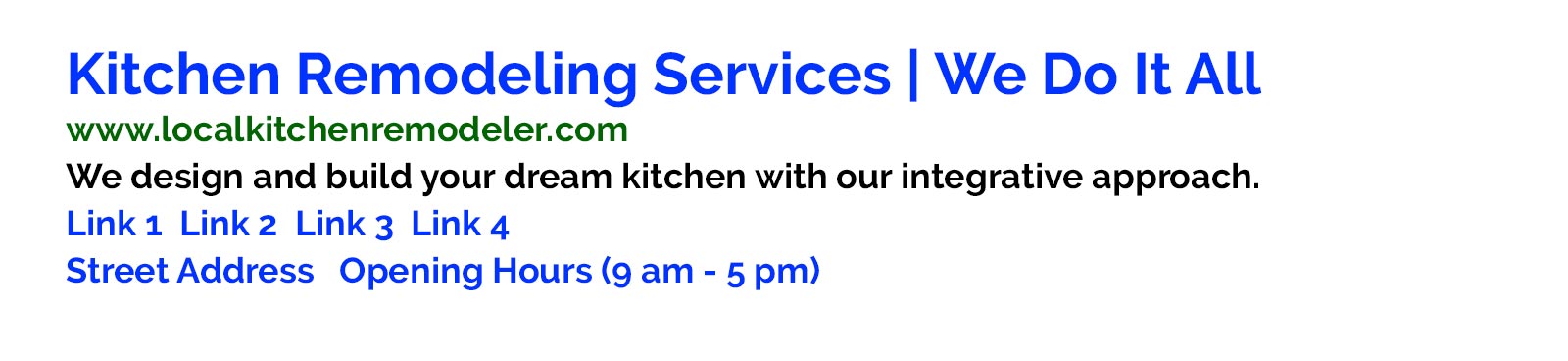
(An ad similar to this one appeared at the #2 spot of Google's paid placements in one local market.)
So can you guess the problem in the ad above?
Answer: There's more than one problem!
The main problem is the weak USP (unique selling proposition).
Your ad must show your company's point(s) of difference. Also, "integrative" is vague, not specific. Potential clients simply can't connect to this kind of flowery, vague language.
Try not to do that. No one cares about that puffery.
Instead, be specific and communicate your competitive advantage!
For example, if this company specialized in using eco-friendly materials and used "eco-friendly company" or "we use only eco-friendly materials" in their ads, chances are they would do much better than using a vague term like "integrative".
Do you know what makes your remodeling company different in the marketplace?
Knowing this (and applying it to your ad copy) could be the difference between success and wasting a boatload of money.
Mistake #2: Failure to Set Up Conversion Tracking

Image by Ryan McGuire from Pixabay
One of the most common mistakes made by kitchen contractors is failing to set up conversion tracking in Google Ads. How will you know if your campaigns are working without doing so?
Without manually setting up conversion tracking, it's like driving with your eyes closed.
You won't know which keywords are driving clicks, visits, and conversions on your site (such as email inquiries and phone calls) and which one's aren't.
Overall, this means it's impossible to optimize your campaign over time for ROI.
And that is just a waste.
Takeaway: Install the proper tracking in your campaigns ASAP!
Mistake #3: Repetitive Messaging
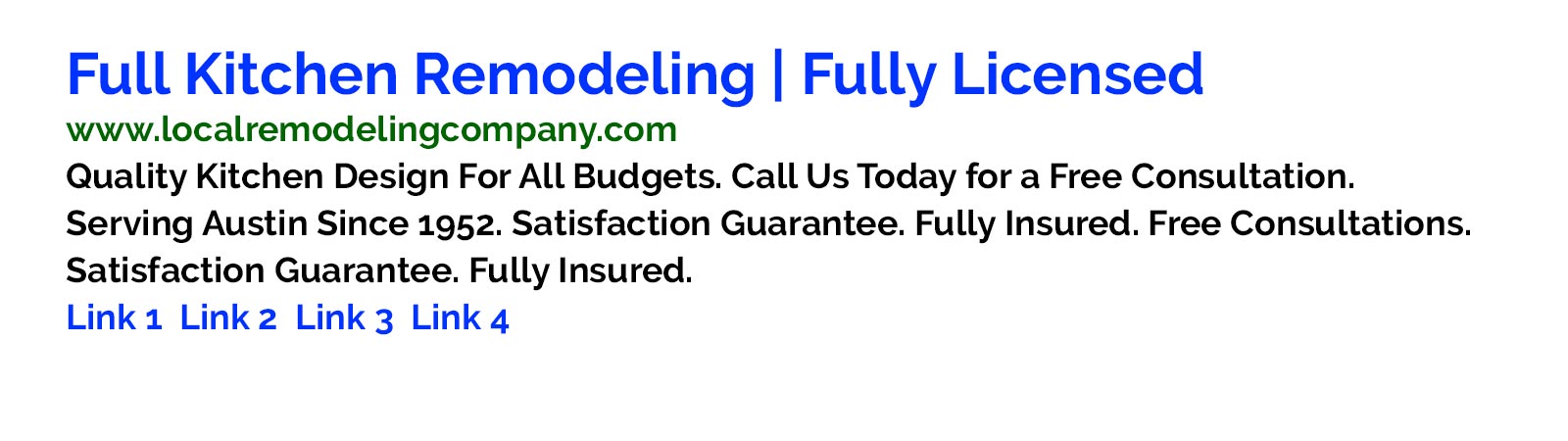
(An ad similar to this one appeared at the bottom of page 1 in Google.)
So what's wrong with the ad above?
If you look carefully, you'll notice that the ad writer wasted valuable ad copy "real estate" by repeating messages!
In this case, the phrases "Satisfaction Guarantee", "Fully Insured", and "Free Consultations" were repeated.
The repetition makes the ad seem disorganized. It can't be helping the ad, which is currently on the bottom of page 1.
And that's not mentioning the opportunity cost of not testing more unique benefits or special offers in the ad text.
Let's take a look at another ad below:
Mistake #4: Failure to Conquer Enough Ad "Real Estate" on Google (or in other words, not using extensions)
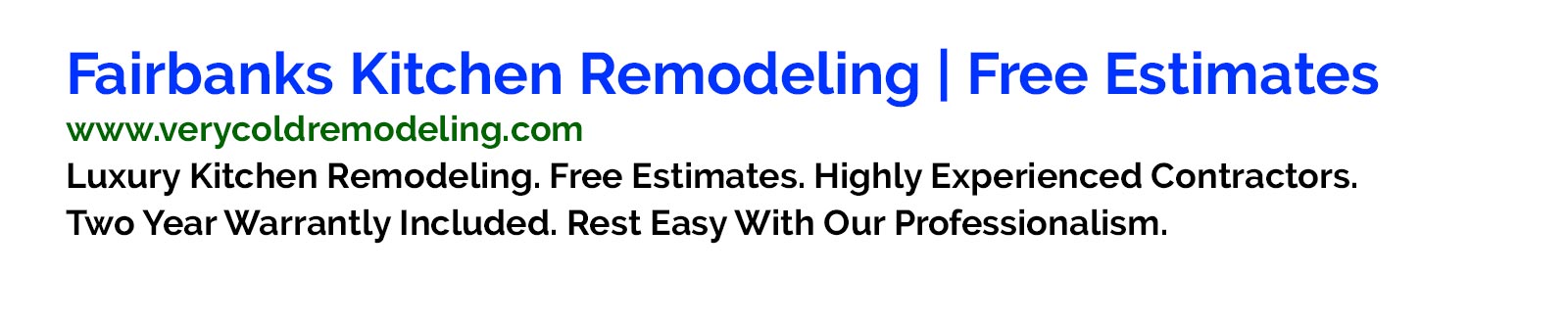
So what's missing in the ad above?
You might notice that there's no address, no office hours, no links to several pages on your site, and no phone number. The ad size is also relatively compact.
In other words, It's not taking up as much screen "real estate" on Google as it could. And when you conquer more screen real estate on desktop and on mobile, the chances that your ad will win increases.
How can you try to take over more space on page one with you ad?
There's a relatively new feature in Google Ads called "extensions".
When creating an ad, you'll be given the option to add extra information about your business that could make your ads not only more informative and attractive, but also helps you take up more space in the Google Ads placements.
(That said, Google decides whether to use the extra information, so you can't control whether the extension info ultimately appears on your ads.)
For example, site links are a popular extension. These are links to separate pages on your site which appear in hyperlinked blue under your ad copy.
Another popular extension is the location extension for local offices.
There are a few more too.
The major benefit of these extensions is typically more clicks on your ads - which means more prospective clients arriving at your site, more leads, and more customers - all for the same ad budget. (Google won't charge you extra for adding extensions.)
Mistake #5: Not Testing Ad Copy All the Time
Did you know that writing ads for your contracting business is not a one-time chore?
Not everyone knows this, and it's too bad. Why?
Because without constant testing, YOU DON'T KNOW IF YOUR CURRENT ADS ARE THE BEST THEY COULD BE!
To cut to the chase, you should be testing your ads all the time.
The way to do that is to run different ads against your "control" ads every month.
It's like having two boxers in the ring every month for every ad group. May the best man win!
Why optimize your ads by testing them constantly against each other?
Because this way you can find the "winner" ads and begin to beat the competition.
"Winner" ads tend to bring you more prospects via more clicks. Sometimes Google also rewards you with lower click costs and higher (ad) quality scores.
It's a virtuous cycle, but if you want to win, you need to keep testing your ads against each other.
Mistake #6: Failure to Filter Out Money-Wasting Keywords

Image by WikimediaImages from Pixabay
Are you filtering out negative keywords from your campaign on a weekly basis? If not, you're probably bleeding money on your campaign.
Why? Because your ad is showing up for some really crappy searches.
For example, if someone types into Google "low budget kitchen remodeling" and you offer only $50K and above remodeling projects, you don't want your ad appearing on such searches. It's a waste of ad impression and you really, really don't want to pay for clicks like that.
Another example: Someone searches for "DIY remodeling tips" in Google in your local area. Unless you're promoting a piece of content on that topic, you probably don't want that click either.
And you most likely don't want your ad to appear when people type "free".
The only way to keep tabs on when your ad pops up and limit the number of unqualified traffic is to keep your keyword lists as clean as possible.
How is this done? By adding "negative" keywords to your campaigns on a weekly basis based on reports in your dashboard.
If you're not constantly keeping tabs on your keywords, your campaign will remain un-optimized and more costly than necessary.
Last but not least, there are so many searches that are impossible to think of in advance when initially setting up your campaign, and that's why you need to look at your search terms report and comb through it for negative keyword ideas on a weekly basis.
Mistake #7: No Clear CTA (Call to Action) in Your Ads
Remember this ad from Mistake #1? There are more problems here.
The second problem is that there is no clear Call-To-Action (CTA).
You can't assume that people will click on your ad without a) telling them to do so and b) giving the a good reason to do so.
A clear CTA could be any relevant action, such as "Call Us Now", "Call Us Today for a Free Estimate", "Get Your Free Consultation", "Download a Free Project Planning Guide", etc.
(Note: While you might be getting some clicks without clear CTAs, chances are that your ads are doing worse than if you have clear a clear call-to-action.)
Takeaway: Look at all your ads. Do they have call-to-action text in them? If not, consider running a split test experiment with ads that do have clear call-to-actions!
Mistake #8: Messing Up Location Targeting

It's sad but I see plenty of kitchen remodeling businesses making the costly mistake of advertising outside their local area.
If you serve clients within a 10-20 mile radius only, then there's no point in advertising outside of that radius.
It's a waste to having your ads show up when people 80 miles away search for your keywords.
At worst, you'll get some wasted clicks from people who can't become customers.
At best, your ads could rack up wasted impressions, which reduces your campaign quality.
Takeaway: Luckily, restrictive geo-targeting can be setup in Google Ads, so make sure to look into this option when setting up campaigns.
Mistake #9: No Remarketing Set Up

Most people who arrive at your website leave.
That said, since you paid for the clicks, doesn't it make sense to follow up later with at least some of these people?
And what's one way to do that? Answer: With remarketing (also known as retargeting) ads.
With remarketing set up correctly, you can show ads to people based on the behavior on your website.
For example, you can display ads to people who visited your website or a specific page on your website in the last 30 days.
If you offer a free downloadable report, you can remarket to people who signed up for the report but failed to take further action.
Last but not least, remarketing ads tend to be cheaper than advertising to "cold" traffic (people who never heard of your company before.)
Takeaway: Get remaketing set up on your website if you haven't yet done so. Most people leave your site, so there's a need to keep in touch to move them further down the sales funnel.
Mistake #10: Wrong Keyword Match Types

This is the last mistake on the list, but it's a biggie.
Too many people aren't taking into account the huge importance of match type when going after keywords.
Google Ads offers several match types, ranging from Broad Match to Exact Match.
Do you know which to use? It's not always so simple to decide.
The problem of going after only exact match keywords is that your ads might not show up frequently enough.
The problem of going too broad is getting too much irrelevant traffic to your website.
Takeaway: Look further into figuring out your desired match types when creating and maintaining your campaigns. Over time, getting it wrong in either direction can have negative effects on your results.
Summary
The ten mistakes above are quite common. Indeed, the difference between a thriving campaign and one that fails is in the small details.
Get these details right, optimize your account weekly and monthly, and you should see better results over time.